AiOffice 2.1.5 Release: Comparing Cursor and Trae Across Five Dimensions
In the fast-evolving landscape of AI tools, the core question for developers and office users has shifted from “Is there an AI available?” to “Which AI tool is truly suitable for my work scenario?”
Cursor and Trae have gained significant attention as AI programming tools, amassing a large user base among developers. In contrast, AiOffice has chosen a different path from the outset—serving not only technical users but also enabling non-technical users to efficiently utilize AI for daily office tasks.
With the official release of AiOffice 2.1.5, this differentiated approach has undergone a systematic capability upgrade. This article will compare AiOffice 2.1.5, Cursor, and Trae across five core dimensions to help users from different backgrounds make clearer judgments.
Dimension 1: Usability—Who Can Get More People to Use It?
The value of an AI tool ultimately depends on how many people can effectively use it.
Cursor is a deeply integrated AI-enabled code editor (IDE). Its core interaction logic is built around the coding environment, requiring users to have basic programming knowledge and engineering thinking to fully leverage its capabilities. This design is natural for developers, but poses a high barrier for non-programming users.
Trae also targets enhanced technical workflows, although it may appear lighter in product form. However, its core use cases still revolve around coding and technical tasks, requiring users to understand the technical implications of AI outputs and possess the ability to make independent judgments and corrections.
AiOffice 2.1.5 has systematically optimized its usability. It does not require users to have any programming background or configure a development environment. Users can directly describe task requirements in natural language upon opening the platform, and the system will automatically match the most suitable processing workflows and skill packages.
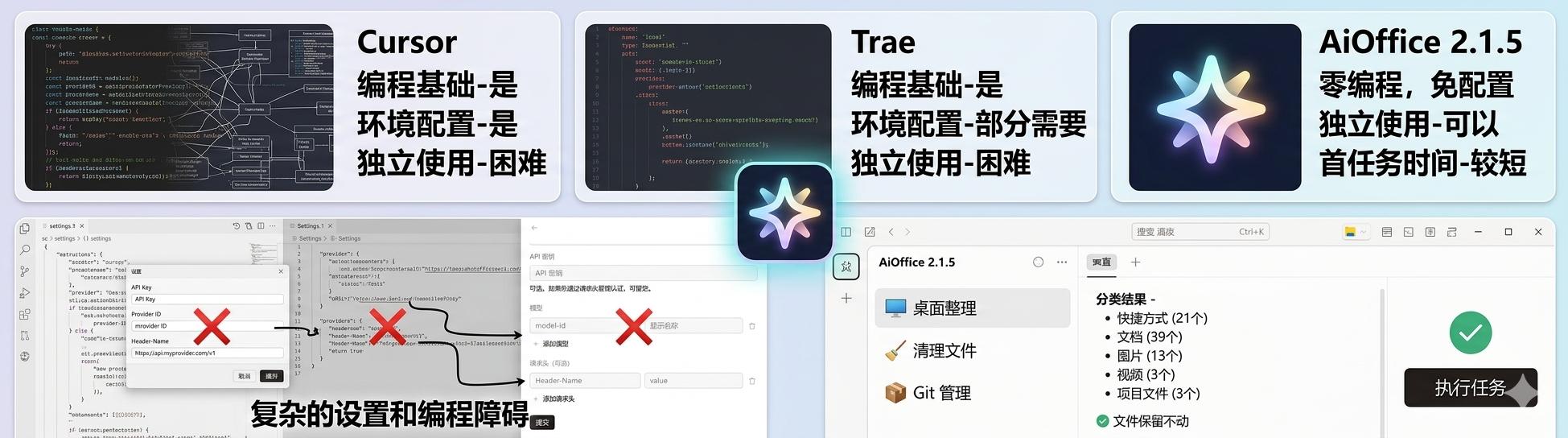
For mixed teams (comprising both technical and non-technical personnel), the low barrier of AiOffice 2.1.5 translates to higher team coverage and lower training costs.
Dimension 2: Office Scenario Coverage—Who Can Solve More Real Work Problems?
The practicality of AI tools ultimately hinges on how many real work scenarios they can cover.
Cursor and Trae primarily focus on development scenarios: code generation, code completion, bug debugging, project understanding, and code refactoring. They perform excellently in these areas, but their ability to directly address office problems outside the coding context is relatively limited.
AiOffice 2.1.5 offers significantly broader scenario coverage. In addition to supporting basic text generation and conversational interaction, it provides deep support in the following office scenarios:
- Document Processing: Long document summarization, content extraction, format conversion, multilingual translation
- Spreadsheet Analysis: Excel data cleaning, metric extraction, anomaly detection, trend analysis
- Report Generation: Structured generation of weekly/monthly/quarterly reports
- Meeting Minutes: Automatic organization of meeting content, key point extraction, to-do item identification
- Content Creation: Generation of various types of content such as articles, marketing copy, product descriptions
- PPT and Presentations: Automatic generation of presentation frameworks based on content
- PDF Processing: Reading, analyzing, and extracting content from PDF documents
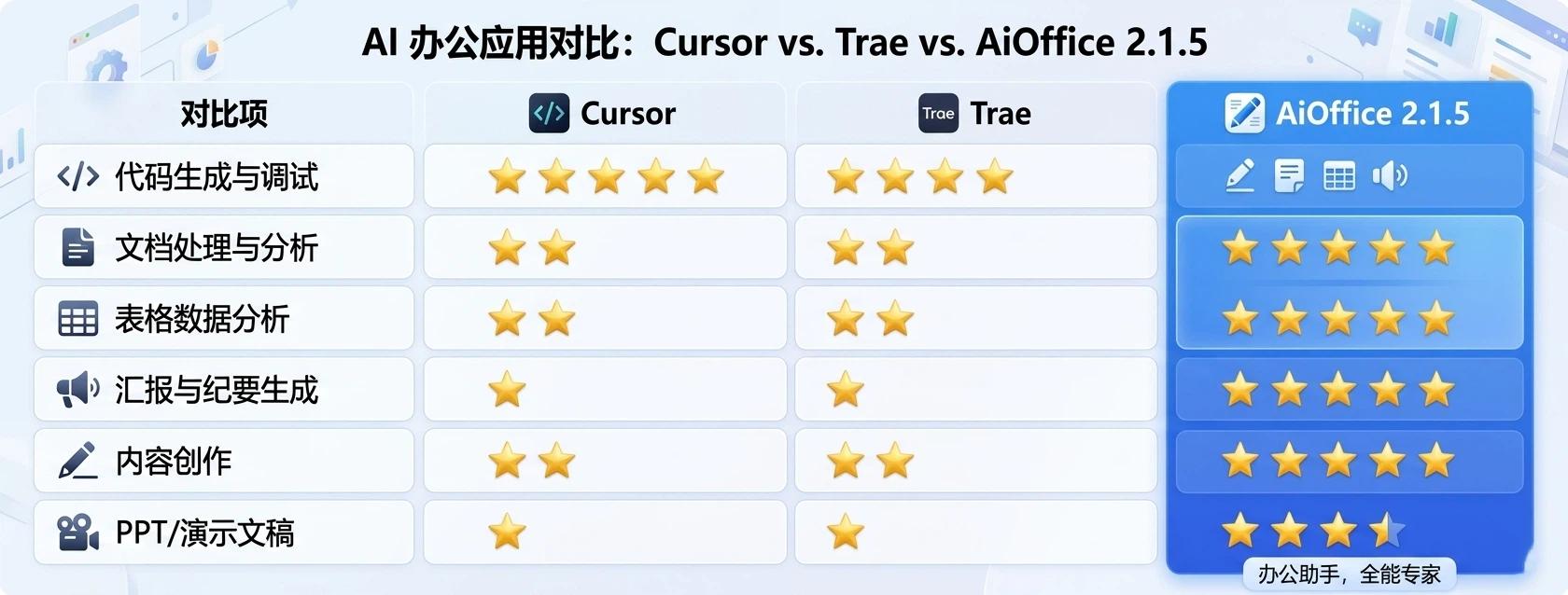
It is worth noting that while Cursor and Trae excel in code-related scenarios, AiOffice 2.1.5 clearly stands out in terms of covering more real office scenarios.
Dimension 3: Skills Package Ecosystem—Who Has Stronger Plug-and-Play Capabilities?
The long-term competitiveness of AI tools largely depends on the richness and scalability of their ecosystems.
Cursor’s ecosystem revolves around the plugin system of the code editor, allowing users to enhance specific development capabilities through extensions. Trae is also making progress in ecosystem development, but it remains relatively early in its stages.
AiOffice 2.1.5 has built an open ecosystem containing 30,000+ Skills packages. Each Skill is a pre-packaged solution for specific office tasks, integrating well-tuned prompt engineering, task decomposition logic, and result post-processing workflows.
This means users do not need to study how to write prompts or understand model invocation methods; they simply select the corresponding Skills to obtain high-quality output results directly.
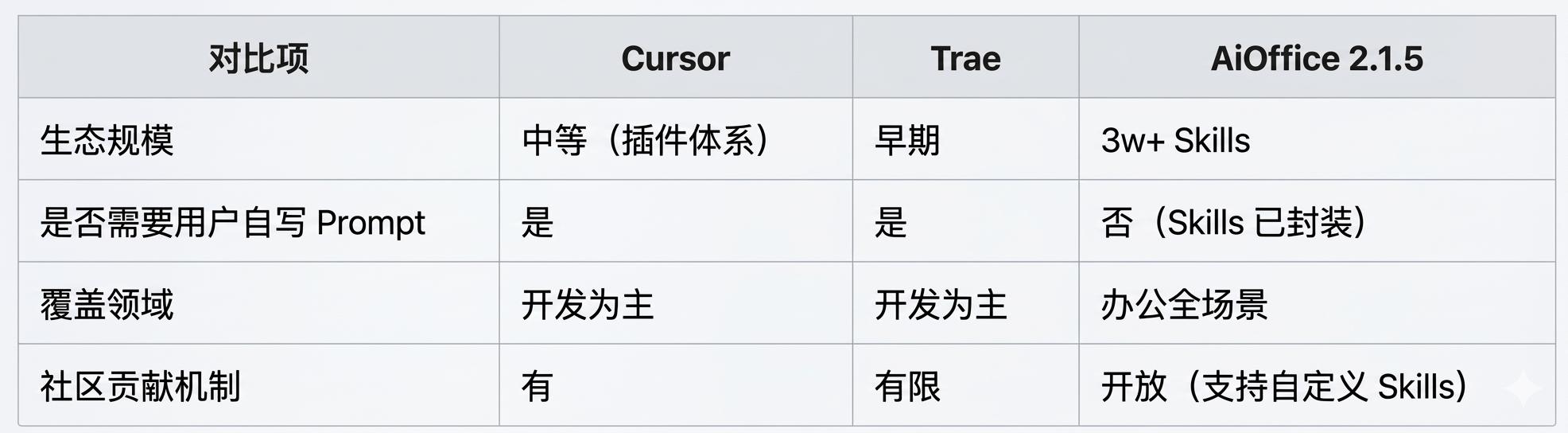
For ordinary office users, the value of the Skills ecosystem lies in transforming complex AI capabilities into a simple operation of “select one, click, and get results.” This plug-and-play experience is something that Cursor and Trae have yet to achieve in the office domain.
Dimension 4: Task Orchestration Capability—Who Can Handle More Complex Workflows?
Real office tasks are often not completed in a single step. A complete quarterly analysis report may involve multiple steps, including data organization, metric extraction, trend analysis, risk identification, conclusion writing, and format optimization.
Cursor and Trae primarily rely on users to organize multi-turn dialogues or manually link multiple operations to complete complex tasks. The models themselves lack the ability to automatically decompose and orchestrate complex tasks.
AiOffice 2.1.5 introduces a main task + sub-task orchestration mechanism. When users submit a complex task, the system automatically decomposes it into multiple sub-tasks and executes them in logical order. Each sub-task is handled by the most suitable role and capability module, ultimately integrating the results of all sub-tasks into a complete deliverable.
For example, to “generate a quarterly business analysis report”:
Main Task: Generate Quarterly Business Analysis Report
  ├── Sub-task 1: Data Organization and Standardization
  ├── Sub-task 2: Core Metric Extraction and Calculation
  ├── Sub-task 3: Year-on-Year/Month-on-Month Trend Analysis
  ├── Sub-task 4: Risk and Anomaly Identification
  ├── Sub-task 5: Conclusion and Improvement Suggestions Generation
  └── Sub-task 6: Final Document Integration and Expression Optimization
This orchestration mechanism brings two significant advantages:
- Higher Execution Quality: Each sub-task is executed based on clearer goals and more precise context, avoiding common issues of logical confusion and information loss in single long-text generation.
- Stronger Control: Users can view intermediate results of each sub-task during execution and make adjustments as needed.
| Comparison Item | Cursor | Trae | AiOffice 2.1.5 |
|---|---|---|---|
| Supports automatic task decomposition | No | No | Yes |
| Execution method for multi-step tasks | User manual linking | User manual linking | System automatic orchestration |
| Can intermediate results be viewed/adjusted | Partial support | Partial support | Full support |
| Stability of complex task outputs | Depends on context length | Depends on context length | Ensured by decomposition |
For users who frequently handle complex office tasks, orchestration capability is a decisive differentiator.
Dimension 5: Token Consumption and Cost-Effectiveness—Who Can Make AI More Affordable?
For users and teams that frequently use AI tools, token consumption directly relates to long-term usage costs. This dimension is often overlooked, but it is a key factor determining whether AI tools can be scaled within enterprises.
Cursor and Trae typically adopt a “large context single-step processing” approach when handling complex tasks. Users need to input all background information, materials, and goals at once. While this method is straightforward, it leads to a significant amount of irrelevant information being sent to the model, resulting in token wastage. This issue is exacerbated in multi-turn dialogues, where repeated context carrying amplifies the problem.
AiOffice 2.1.5 significantly optimizes token usage efficiency through two mechanisms:
- Task decomposition reduces ineffective context transmission: The main-subtask mechanism breaks complex work into smaller processing units, with each sub-task receiving only the necessary information for the current stage, thereby reducing irrelevant context injection.
- Multi-role division reduces repetitive reasoning: AiOffice 2.1.5 is equipped with 15 specialized roles, each tailored for different task types. The role capabilities align more closely with task objectives, meaning the model does not need to make broad generalizations at every step, thus reducing the cost of repetitive reasoning.
| Comparison Item | Cursor | Trae | AiOffice 2.1.5 |
|---|---|---|---|
| Context management method | Full transmission | Full transmission | Precise injection by sub-task |
| Token accumulation in multi-turn dialogues | High | High | Controlled through decomposition |
| Is there a role division mechanism | No | No | Yes (15 specialized roles) |
| Long-term usage cost controllability | Average | Average | Good |
For enterprise teams, optimizing token efficiency not only means lower direct costs but also allows AI tools to be used more frequently and broadly without being constrained by cost pressures.
Conclusion: Different Tools, Different Battlegrounds, Different Values
Through the above five-dimensional comparison, it is clear to see:
Cursor and Trae still have significant advantages in code development scenarios. Their deep integration with development environments, precise understanding of code context, and efficient performance in programming tasks make them indispensable productivity tools for developers.
AiOffice 2.1.5, on the other hand, demonstrates systematic leading advantages in a broader range of office scenarios:
- Lower usability barriers allow non-technical users to efficiently use AI
- Wider scenario coverage comprehensively supports documents, spreadsheets, reports, and minutes
- Stronger Skills ecosystem with over 30,000 skills enabling plug-and-play functionality
- Smarter task orchestration ensures the execution quality of complex tasks through main-subtask mechanisms
- Better token efficiency lowers long-term usage costs through refined management
| Overall Evaluation | Cursor | Trae | AiOffice 2.1.5 |
|---|---|---|---|
| Most suitable users | Developers | Developers | Everyone (Technical + Non-Technical) |
| Core advantage scenario | Code Development | Code Development | All Office Scenarios |
| Ecosystem maturity | High | Developing | High (30,000+ Skills) |
| Complex task handling | Relies on user capability | Relies on user capability | System automatic orchestration |
| Long-term usage cost | High | Moderate | Low |
The final choice depends on your core work scenarios. If your daily work is primarily code development, Cursor and Trae remain worthy options. However, if your work involves document processing, data analysis, content creation, report generation, or encompasses both technical and non-technical personnel in your team, then AiOffice 2.1.5 will be a more comprehensive, efficient, and cost-effective choice.
The competition among AI office tools is shifting from “whose model is stronger” to “who can enable more people to accomplish more tasks.” The release of AiOffice 2.1.5 is a strong testament to this trend.

Comments
Discussion is powered by Giscus (GitHub Discussions). Add
repo,repoID,category, andcategoryIDunder[params.comments.giscus]inhugo.tomlusing the values from the Giscus setup tool.